A simple step-by-step process from inbound shipment to collection. Follow the guide below to see how our process seamlessly integrates with your client dashboard.
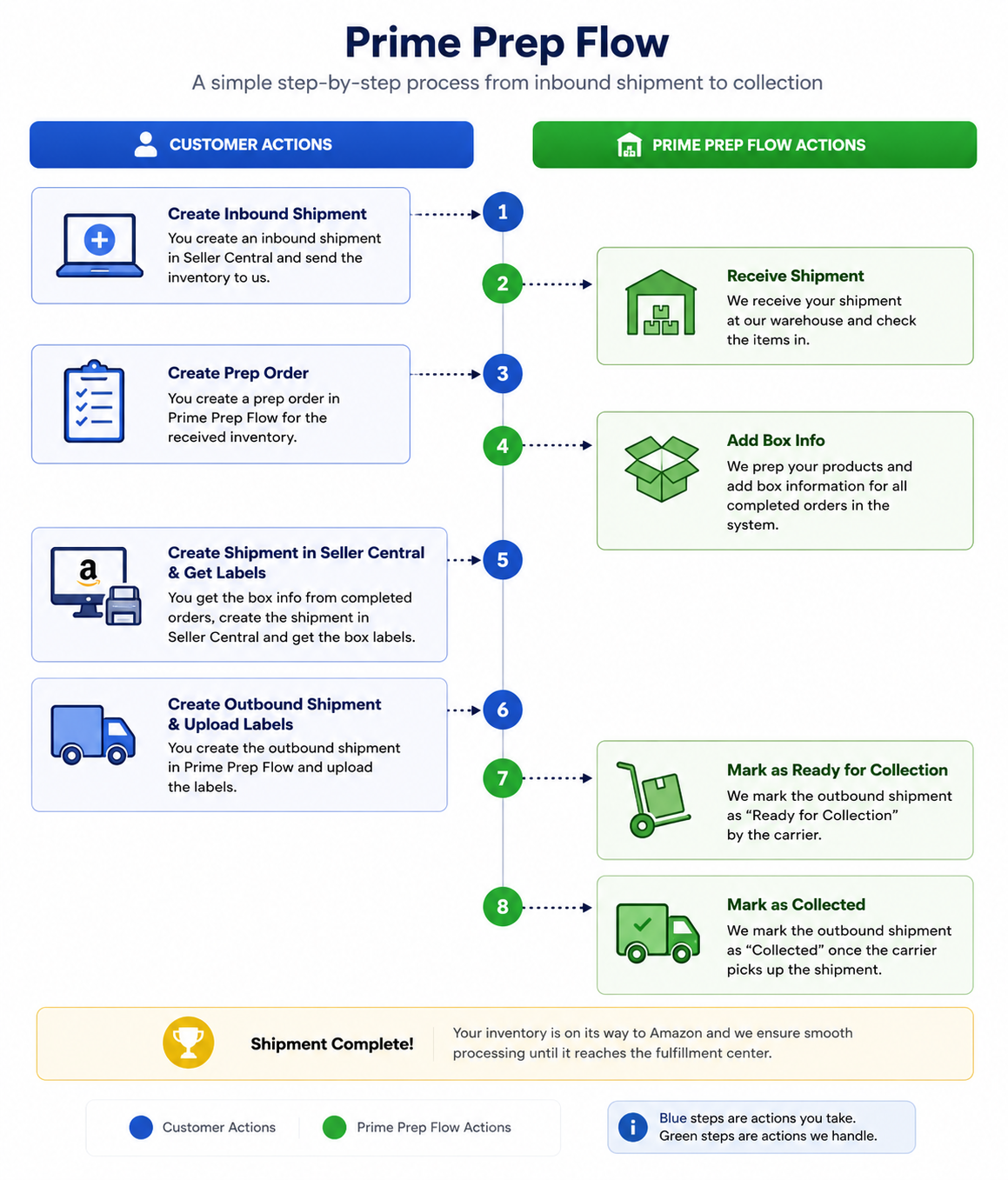
You create an inbound shipment in Seller Central and send the inventory to us.
We receive your shipment at our warehouse and check the items into the system.
Once your inventory is successfully received, you can create a prep order in Prime Prep Flow for the received inventory.
Our team expertly preps your products and adds the detailed box information for all completed orders into the system.
Using the box info provided from the completed orders, you create the shipment in Amazon Seller Central and generate the necessary box labels.
You create the outbound shipment in Prime Prep Flow and upload the Amazon-provided labels.
Once labels are applied, we move your boxes to the dispatch zone and mark the outbound shipment as "Ready For Collection" by the carrier.
We finalize the process by marking the outbound shipment as "Collected" once the carrier picks up your shipment. Your inventory is now on its way to Amazon!